WCAG 2.1 AA · Section 508 · ADA Title III
An overlay widget is not an audit.
3,117 federal ADA lawsuits were filed in 2025 — 27% more than the year before. About 40% of those sites had an overlay widget installed when they were sued. We run axe-core against your rendered page, map every WCAG 2.1 AA failure to a criterion, and hand you the exact CSS selector. No vague recommendations.
www.w3.org/WAI/demos/bad/ — example scan
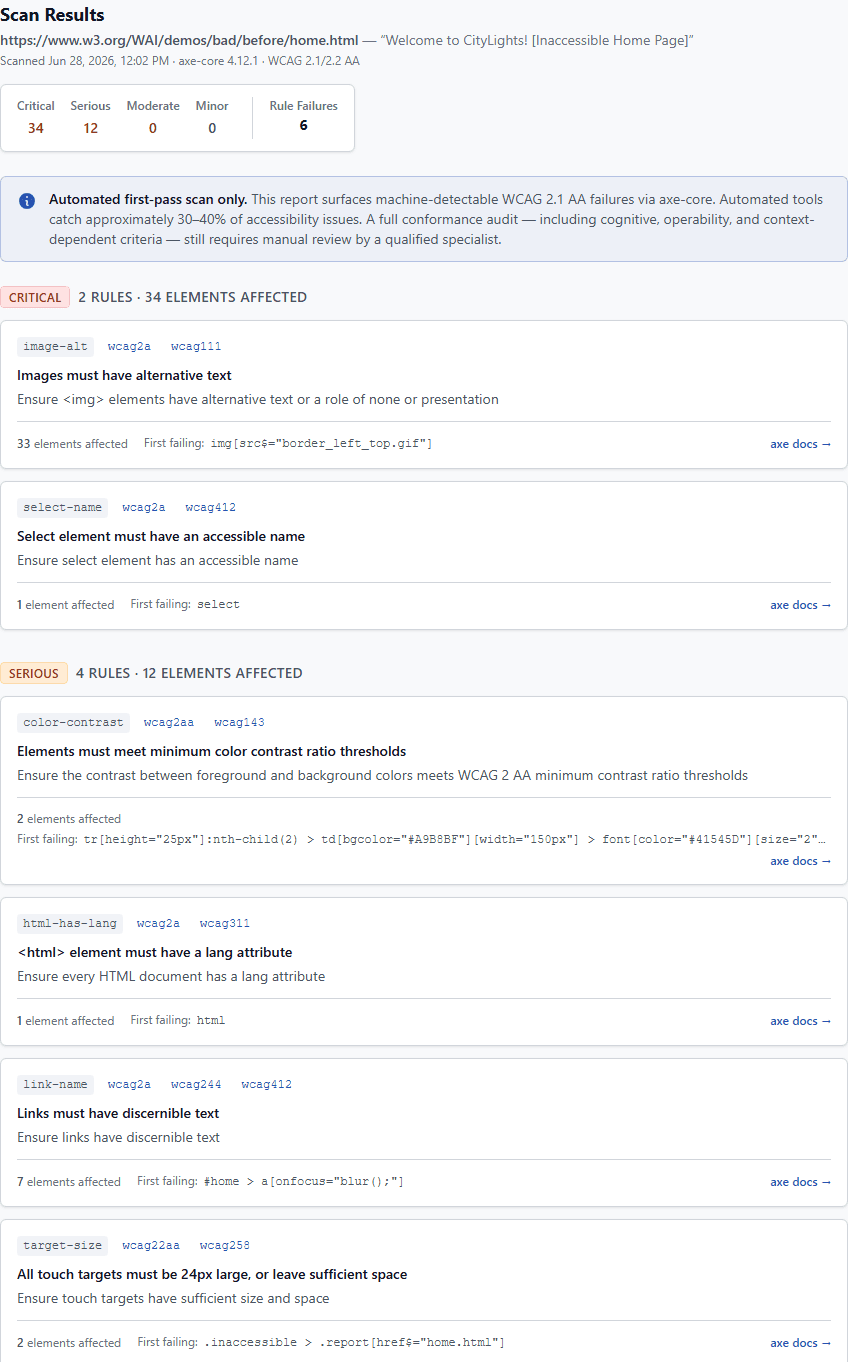
6 rule failures · 46 elements affected · axe-core 4.12.1 · WCAG 2.1/2.2 AA
image-altwcag2awcag111Images must have alternative text
img[src$="border_left_top.gif"]select-namewcag2awcag412Select element must have an accessible name
selectcolor-contrastwcag2aawcag143Elements must meet minimum color contrast ratio thresholds
td[bgcolor="#A9B8BF"] > font[color="#41545D"]Real axe-core output via Playwright — not a mockup. Scan the W3C intentionally-inaccessible demo page.
Scan your site now — free, no account required.
Accessibility lawsuit statistics
- 3,117
- Federal ADA lawsuits filed in 2025
- +27%
- Year-over-year increase
- ~40%
- Of sued sites had an overlay installed
- ~75%
- Of cases target ecommerce sites
- $25K–$75K+
- Typical settlement cost
Why an overlay widget fails your WCAG 2.1 AA audit.
An overlay widget injects JavaScript at runtime — patching contrast, stuffing ARIA labels, rewriting keyboard behavior — without touching your source. A court doesn't care about the patch. It cares whether a screen reader user can actually complete a task on your site.
In 2025, the FTC fined overlay vendor accessiBe $1M for falsely claiming its AI widget makes sites WCAG-compliant. Their product was installed on the sites that got sued.
A real audit reads the DOM the way a screen reader does — after your JavaScript runs, with real content loaded. Every failure maps to a WCAG criterion, lists the affected elements, and gives a CSS selector. That's where the fix goes: in the source, not a widget.
Product overview
Audit output
What a real WCAG 2.1 AA report looks like.
Every failure is mapped to the WCAG criterion that creates legal exposure, shown with its severity level, the number of elements affected, and the exact selector so a developer knows where to look. No vague recommendations — specific, actionable findings from the rendered DOM.
What an automated WCAG accessibility audit catches — and what it doesn't.
Machine-detectable by axe-core
- Missing or empty alternative text on images
- Form inputs without associated labels
- Color contrast below WCAG 2.1 AA thresholds
- Missing page language declaration
- Broken or missing ARIA roles and landmark structure
- Links and buttons without discernible text
- Heading hierarchy violations
- Keyboard focus traps
Requires human review
- Whether alt text is actually meaningful, not just present
- Whether error messages are genuinely understandable
- Cognitive accessibility and plain-language requirements
- Whether video captions are accurate
- End-to-end user flow testing with a screen reader
Automated scanning covers the failures that show up in most complaints. A full WCAG 2.1 AA conformance determination still requires a qualified specialist — we say so because it's true.
Find ADA compliance issues before you get sued.
Free. No account. Paste a URL and get a WCAG violation report in under 30 seconds.
Scan your site now